
Support Our App — Help bring smarter paycheck planning to more people.
How PayPath Works
Master your financial flow in three simple steps designed to align with your real-life pay cycles.
Add Your Money
Enter income, paydays, recurring bills, household expenses, savings goals, and debt payments.
Build Your Paycheck Plan
PayPath organizes everything by date and helps users understand what must be paid from each paycheck.
Follow Your Path
Review the monthly calendar, upcoming obligations, and available spending money so there are fewer financial surprises.
FEATURES
Income and payday planning
Recurring bill organization
Contractor & 1099 Tools (Pro)
Organize every dollar based on when your paycheck arrives to ensure coverage for all upcoming bills.
Keep track of all fixed expenses with due dates and categories in one centralized dashboard.
Manage per-project dates, pay, per diem, mileage, reimbursements, expenses, and receipt capture. Export tax-ready records to print or PDF. Note: PayPath helps organize records and is not tax advice.
Paycheck-by-paycheck budgeting
Household budgeting
Spending-limit warnings
Manage your budget in cycles defined by your income timing rather than strict calendar months.
Plan household bills and goals alongside paycheck dates within your PayPath account.
Stay informed with indicators that help prevent overspending before your next payday arrives.
Financial charts and insights
Visualize your progress and spending trends with intuitive graphical representations.
See PayPath in Action

Home

Contractor Tools (Pro)
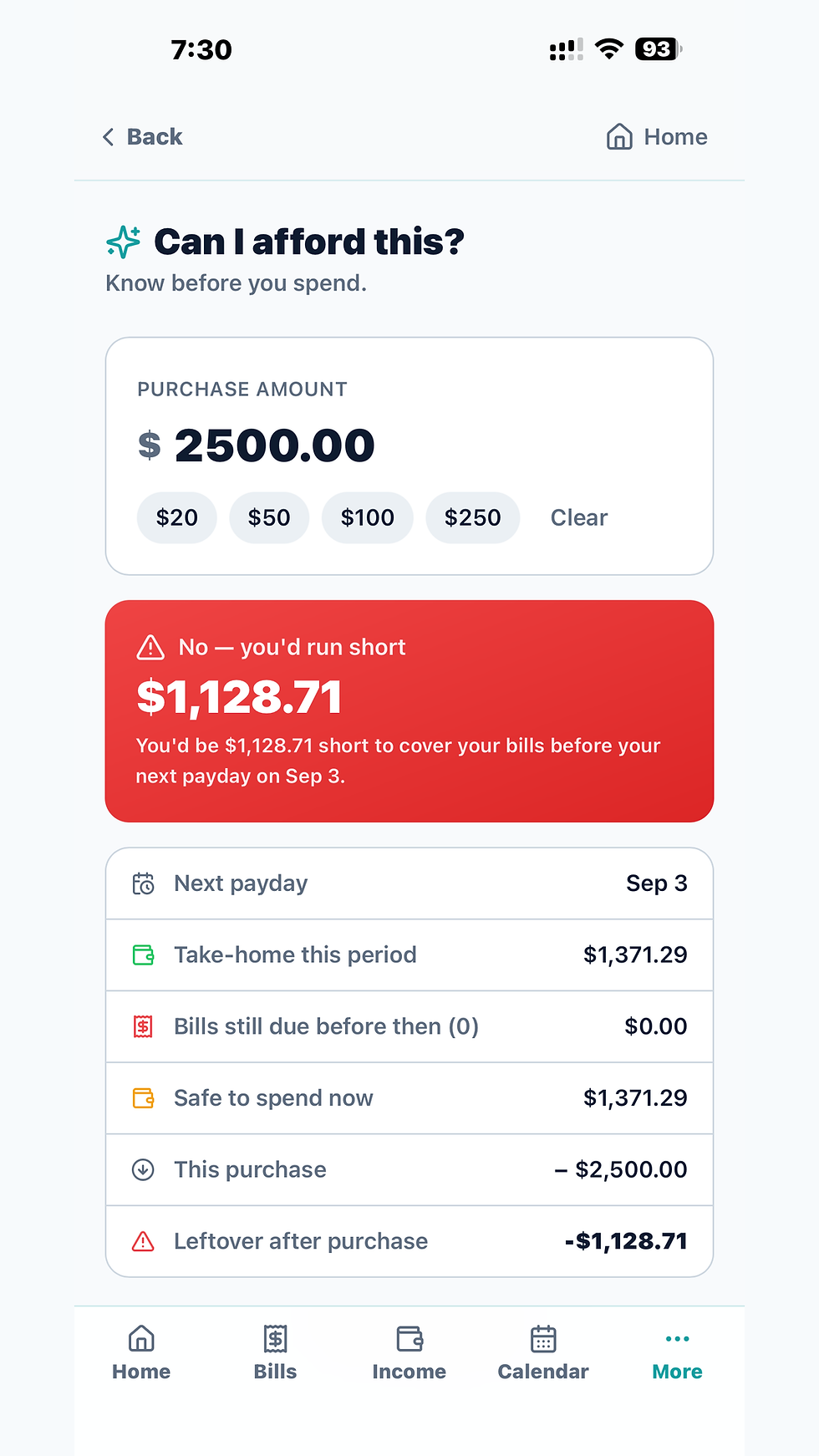
Can I Plan This
Home
Contractor Tools (Pro)
Can I Plan This
About PayPath
PayPath was created to make budgeting easier for people whose financial lives revolve around their paychecks. Traditional monthly budgets do not always make it clear which paycheck should cover each bill or how much money is truly available between paydays.
PayPath brings income, recurring bills, household expenses, savings goals, and debt payments together in one organized plan. Its purpose is simple: help people see what is coming, make confident spending decisions, and experience fewer financial surprises.

How PayPath Compares
While most apps focus on monthly totals, PayPath is built for the cash flow between paydays—especially for those with variable income.
Paycheck-by-paycheck planning
PayPath
Primary focus: dates and pay cycles
Copilot Money
General budgeting
Flexible/irregular income
Native support for hourly, tips, gig, and 1099 variability
YNAB
Can accommodate variable income by budgeting money available
Expected-vs-received income
PayPath
Built-in tracking for estimates vs. actual deposits
Monarch Money
General budgeting
Bill calendar
PayPath
Visual due-date timeline aligned with income
EveryDollar
Includes due dates in premium version
Can I Plan This
PayPath
Real-time decision tool based on upcoming obligations
Copilot Money
Not highlighted in reviewed public materials
Contractor/1099 tools
PayPath
Specialized mileage, per diem, and job expense tracking
YNAB
General budgeting
Savings goals
PayPath
Specific targets linked to payday distribution
Monarch Money
Visual goal tracking and progress bars
Household planning
PayPath
Household bills and goals in one account
EveryDollar
General budgeting
Manual use (no linking)
PayPath
Fully functional without bank connections
Copilot Money
Primary focus on automated bank syncing
Reports/PDF & Pricing
Why choose PayPath?
- Built around paydays. Flexible-income planning in Basic. Contractor/1099 Tools in Pro Monthly.
Compare Features
Standard reports and exports are included with Basic. Pro Monthly adds standard Contractor reports, print, and PDF for $10.99/month.
Comparison based on publicly available product information reviewed September 4, 2026. 'Not highlighted in reviewed public materials' is not proof that a feature is unavailable in every workflow. Competitor names are trademarks of their respective owners; no affiliation or endorsement is implied. PayPath is a budgeting, organization and educational tool—not individualized financial or tax advice.
Pricing
Select the path that supports your economic goals. Our transparent tiers provide clarity for every budget.
At launch, the only public paid plan will be Pro Monthly at $10.99/month. PRO+ is Coming Soon and is not purchasable.
Help Shape PayPath
Be among the first 100 approved public testers to help improve PayPath. Approved Founding Testers receive 90 days of PayPath PRO at no cost, with no payment information required. Participants are expected to meaningfully test the app and complete the private beta-feedback process. Testers who complete the program may become eligible for a $25-per-year PayPath PRO founding rate; eligibility is not guaranteed, enrollment is optional, and no one will be charged automatically.
Limited to the first 100 approved public testers. Program availability and terms may change based on testing needs.
Core Features
Core Features
- Flexible Income Support: Manage salary, hourly pay, cash, tips, commissions, benefits, gig work, and daily pay in one place. Weekly Variable Income Log: Instantly record tips and side earnings with daily, weekly, and monthly totals. Expected vs. Received Income: Log estimated income and update it with actual receipts to ensure your cash flow history remains accurate without double-counting.
PayPath Product Roadmap
Our roadmap reflects current functionality and future development goals. All listed tools are subject to change based on user feedback, security standards, and technical updates. Mentioned third-party platforms are the property of their respective owners and do not imply an endorsement of PayPath services.
PayPath empowers you with tools built for real-world earning. Explore our existing suite of contractor and planning features alongside the new capabilities we are currently developing.
Active Pro Tools
Active PayPath PRO Features
- Contractor/1099 Tools: create projects and track mileage, per diem, expenses, and reimbursements. Review standard Contractor reports and print or export PDF. Pro Monthly includes every Basic feature.
Coming Soon
In Development
- Native App Store and Google Play availability is being finalized. PRO+ is Coming Soon and is not purchasable. Automatic receipt/check/document OCR and autofill, detailed reports, connected finance and Smart Reconciliation, Ask PayPath, and Resume Builder are deferred; they are not Basic or Pro Monthly benefits.
FAQ
Find answers to common questions about PayPath and how we help you master your financial flow.
What is PayPath?
PayPath is a budgeting and financial-planning tool that helps people organize income, bills, expenses, savings, and debt around their actual paydays.
What is included with Basic?
Basic includes paycheck and income planning, bills, calendar, forecasting, goals, Can I Plan This, manual Receipt/Check Vault records, and standard reports and exports. Pro Monthly adds Contractor/1099 Tools, mileage, per diem, expenses, reimbursements, and standard Contractor reports.
Does PayPath move or hold my money?
No. PayPath is a planning tool and does not move, hold, or automatically pay money.
Is PayPath financial advice?
No. PayPath provides organizational and educational tools, not individualized financial, tax, legal, or investment advice.
Can couples or households use PayPath?
You can organize household expenses and goals in a PayPath account. Shared multi-account collaboration is not part of the current Basic or Pro Monthly release.
Can I use PayPath on my phone?
Yes. PayPath is designed to work across phones, tablets, and computers through a modern web browser.
Transparency & Trust
Clear Information. Honest Expectations.
PayPath is designed to help users organize their financial information without confusing language or exaggerated promises. We clearly explain what information is collected, how it is stored, and which services help operate the application.
PayPath is a budgeting and financial-planning tool. It is not a bank, lender, credit-repair company, or financial adviser.
Account and Data Deletion Requests